Get your axe and uniform, cut marked trees, carry logs to the sawmill and sell planks. A complete guide to the Lumberjack job.
Category
Economy
Written by
SummitLife Staff
Last updated
September 2026
Lumberjack turns marked trees into logs and logs into saleable planks. You work between Lumberjack Forest, Lumber Sawmill and the Plank Seller. Your payday is the sale of your planks; you do not start a Lumberjack shift in the Jobs app.
Before you start
Requirement
What to prepare
Employment
Apply for Lumberjack at the Job Center and confirm the outfit change
Uniform
The job's cotton shirt, work pants and hiking boots
Tool
An axe; check the General Store for job tools
Inventory
Free space for the log and finished planks
Transport
No dedicated rented job vehicle is required by this workflow
Keep the complete job outfit on while working. The work pants use the same garment as the mechanic pants; use the supplied preset to avoid choosing a visually similar but incorrect item. The Plank Seller is also the job's clothing location if you need to restore your outfit.
Photo to add: your full outfit with the axe, beside a marked tree.
Controls and work sequence
Action
Control or menu
Chop a tree
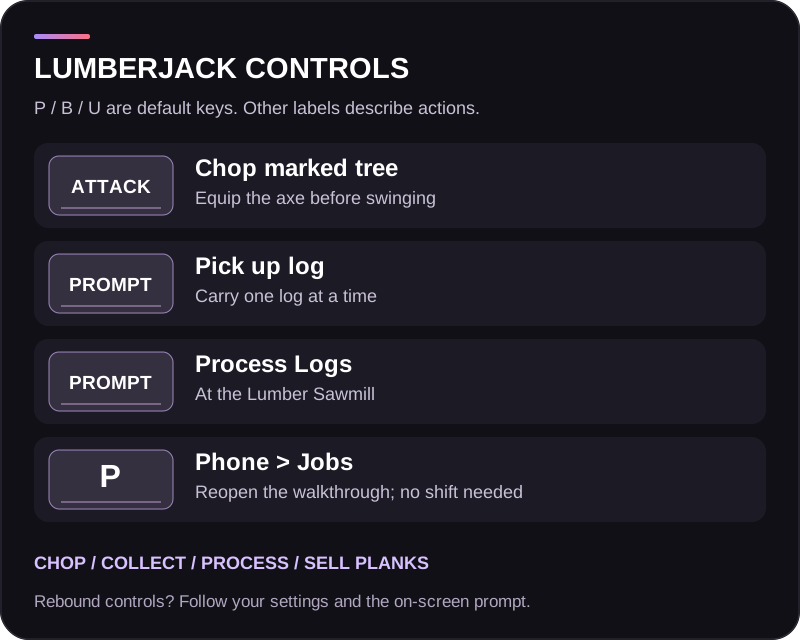
Equip the axe and use your configured attack binding
Pick up a log
Aim at the log and use its on-screen pickup interaction
Process a log
Use Process Logs at the sawmill
Sell planks
Open the Plank Seller, choose your sale amount and confirm
Reopen guidance
P > Jobs > How to start and get paid
The interaction and attack keys depend on your bindings. The job uses a real tool swing; looking at a tree without the axe equipped will not harvest it.
Step 1: find and chop a marked tree
Travel to Lumberjack Forest. Choose a marked job tree, move within tool reach, equip your axe and swing at the trunk. Continue until the tree drops logs. Ordinary decorative trees outside the job targets are not a reliable source of logs.
If you receive a job or uniform message, correct that requirement before continuing. Move around the trunk if the tool is striking another object instead of the tree.
Step 2: collect one log
Look at a dropped log and use the pickup action. The log must fit in your inventory. You can carry one log at a time; attempting to collect another while already carrying one is blocked.
Take that log to Lumber Sawmill. Check that the log is in your character's inventory before operating the processor. A log still lying at the forest is not available to the sawmill.
Photo to add: the log pickup prompt and the log inside your inventory.
Step 3: process the log
At the sawmill, use Process Logs and wait for processing to finish. One log produces one plank. The processor handles one operation at a time, so wait if another player is already using it.
The plank is placed in your inventory when space is available. If your inventory is full or unavailable, check the sawmill's output area: the plank can be dropped there. Collect it before leaving.
Repeat the forest-to-sawmill loop to build a batch of planks, keeping enough inventory space for each output.
Step 4: sell your planks
Go to Plank Seller, open the trading menu and review the available quantity and sale quote. Select the number of planks you want to sell and confirm. Successful plank sales pay into your cash balance.
The plank market responds to demand: selling reduces the current price down to a minimum, and the price recovers over time. A large batch can therefore sell for less than the first displayed unit price multiplied by every plank. Review the total quote before confirming.
Photo to add: the sawmill action, followed by a readable Plank Seller sale quote.
Earnings and planning
Your income depends on the number of planks sold and the seller's current quote. There is no fixed hourly return: walking or driving time, available trees, processor use and market demand all affect the loop.
Bring your axe, keep your uniform equipped and plan the forest-to-sawmill journey before cutting a large number of trees. Sell a manageable batch, and check your inventory and cash balance after the transaction.
Troubleshooting
Problem
What to check
Tree does not produce logs
Correct employment and uniform, axe equipped, marked job tree, swing reaching the trunk
Cannot pick up another log
Process or unload your current log first; only one can be carried
Pickup fails
Make space in your inventory and stand close to the log
Process Logs is unavailable
Carry a log in your inventory and wait for the sawmill to become free
Plank appears missing
Check inventory first, then the sawmill output area
No payment after processing
Take the plank to the Plank Seller and complete the sale
Quote is lower than before
The seller's price changes as planks are sold and demand recovers
Finish and choose your next job
Collect your last plank and sell any products you want to cash out. You do not need Start Job or Finish Job for this gathering loop.